Showing posts with label Plugins. Show all posts

Friday, December 14, 2007

Macspoofer

This plugin from Dark_AleX will allow you to spoof the MAC address of your PSP. It goes one step further than previous "MAC Spoofers", as this time the MAC address of your PSP that is broadcast is actually changed. Previous MAC spoofers only edited the MAC address in idStorage, which only changes what is displayed in the System Information screen.

I can't see any use for this on the PSP as of yet, but you're welcome to try it out. Instructions for installation are provided in the readme file.

Note that the MAC address that you see under System Information will still be the same, but the one being broadcast will be changed.

Macspoofer.zip

Sunday, November 25, 2007

CWCheat v0.1.9 Rev I

Another update for CWCheat is here, bringing it to Revision I. CWCheat is arguably the best cheating plugin for the PSP, with support for many different types of cheat codes like Action Replay, Codebreaker, Gameshark, Xploder, etc. It also comes with a search function, which is great when you want to try searching for your own cheat codes. For those who are lazy, a database of cheats is regularly updated and can be downloaded from the main site, or straight to your PSP using an EBOOT that's provided.

Changes in this revision focus on the cheat searching routines, so you don't really need to update your CWCheat unless you do lots of cheat searching, or you just like to have the latest version of everything.

CWCheat v0.1.9 Rev I

Wednesday, November 14, 2007

Manhunt 2 Uncensor PRX

If you haven't heard already, Manhunt 2 was released with censors during the execution scenes, in order to be passed with a M18 rating instead of an AO rating. Shortly after it's release, Russian hackers figured out a way to tweak the config files in order to remove the censors during executions. Further research into this led to a much better hack that uncensored the executions and made it look the way it was meant to be. However, this method only worked with the ISO, and multiple files had to be changed.

All that time can now be spent on actually playing the game, as a plugin has been released to uncensor your Manhunt 2 game without having to mess with any of the files inside the ISO. It will remove the censors from the executions, as well as remove the camera shake effect. Best of all, this plugin works with both the ISO and the UMD of Manhunt 2. You do need to have custom firmware on your PSP before you can use this, though.


To install, copy the PRX to ms0:/seplugins and add the line "ms0:/seplugins/manhunt.prx" to GAME.TXT. Enter recovery menu by holding R-trigger while powering on your PSP, go to the Plugins menu and enable the prx. This plugin will not interfere with other games, so it's safe to leave it enabled.

Download the prx

Wednesday, October 10, 2007

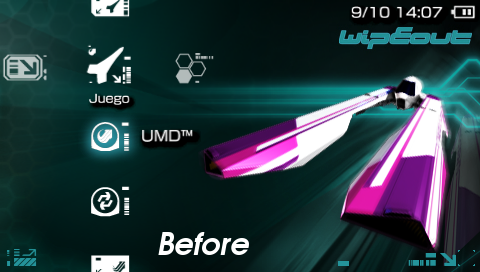
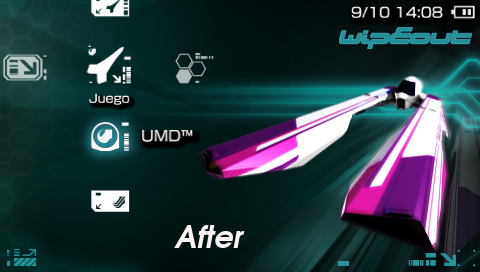
Hide UMD Update Icon: For PSP Slim

A simple plugin for the PSP Slim to remove the UMD update icon in your XMB. In my opinion it's pretty pointless since it's impossible to update to official firmware from custom firmware, Dark_AleX has blocked it.

But for those who just want to remove that icon...


What it looks like at first...


And after the plugin is enabled

This is a plugin, so copy it to the seplugins and install it into vsh.txt only. For those that want to know how it works, it patches the memory in RAM so that instead of looking for the update in DISC0:/, it looks in QISC0:/.

Get the anti-update plugin: Removed by MediaFire

Thursday, October 4, 2007

CWCheat v0.1.9 Rev F Released

Another version of CWCheat has been released by weltall, bringing the latest version to Revision F. This version now comes with support for the latest custom firmware, 3.71 M33. Here's a complete changelog for Revision F:

[ALL] Added support for 3.71 M33 firmware
[ALL] added prxes for the 3.71 M33 kernel lite and full for pops and game. Also an iRShell one, although iRShell is not available right now. For 1.50 homebrews use the prx for 3.52 M33 even if on 3.71 kernel.
[GAME] fixed a little glitch in the function checking the code type if pointer codes were used. Now the pointer codes will work also if not alone in the db
[ALL] Removed a delay in the manual cheat apply which resulted in the application waiting 30 seconds before letting the user gaining back control
[ALL] Reworked operations being made just before PSP reboot (eg: home menu exit). This avoided crashes during this procedure as seen in the betas for 3.71
[PACKAGE] Added an MS_ROOT_371 for easy installation on 3.71+ firmware
[PACKAGE] now the prx for the various firmwares are on the 3.60- and 3.71+ folders

Most of the changes probably don't affect the normal user, but what's good is the 2 folders made for installing CWCheat on PSPs with firmware 3.60 M33 and below, and on PSPs with firmware 3.71 M33 and above. Users with 3.60 M33 and below are to use the files inside the "MS_ROOT" folder, while users with 3.71 M33 and above are to use the files inside the "MS_ROOT_371" folder.

I'm also taking this chance to share with you the cheat db download homebrew. This can be found in the package as well, in the folder "dbdownload". Place that folder into your GAME folder and run the homebrew from the GAME menu to download the latest cheat db from CWCheat's website. Of course, you will need access to the Internet for this to work.

Latest version of CWCheat: Download

Sunday, September 30, 2007

Latest Popsloader by Team M33

Edit: Updated instructions on the prxs required for each firmware.


The latest Popsloader has been released by Team M33. This popsloader promises to be compatible with all pops currently. For those who don't know what this is all about, popsloader allows you to load the pops from different firmware versions for use with the PSX emulator. This popsloader works on firmwares up to 3.60 M33 only.


The popsloader will require you to obtain certain prxs from the firmware files. To do this, you will need PSARDumper and the EBOOT.PBP of the firmware that you are dumping.

Now I'll teach you how to install popsloader and set it up with the 3.40 firmware pops files. Note that the highest version pops that can be loaded by this is 3.52, so don't try to dump the pops file from the 3.71 firmware.

Things you will need
PSARDumper
Firmware 3.40 EBOOT.PBP
Popsloader

1. Connect your PSP to your computer, and copy PSARDumper to the GAME folder or GAME3XX folder. This PSARDumper works on the newer 3.xx kernel so do not put it in GAME150.

2. Extract the firmware 3.40 EBOOT.PBP and place it in the root of your memory stick.

3. Extract the Popsloader files and place them into the seplugins folder. Remember to add the line "ms0:/seplugins/popsloader.prx" to pops.txt so that the plugin will be loaded.

4. Disconnect your PSP from the computer. On your PSP, run PSARDumper. Press Square to decrypt all.
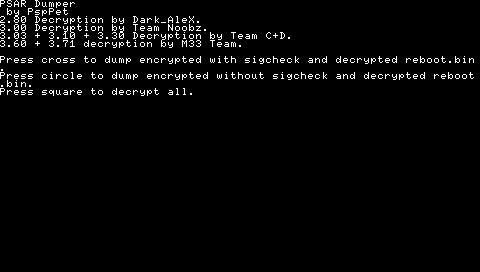

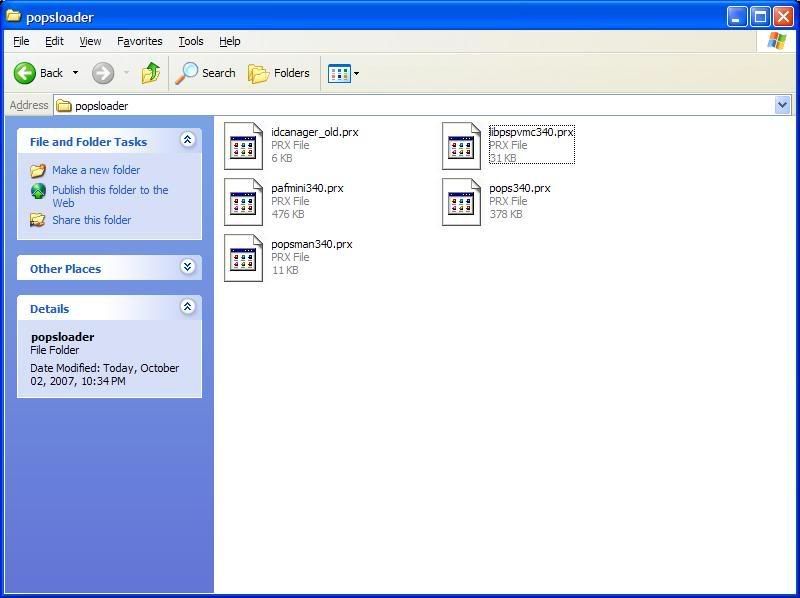
5. When PSARDumper is done it will restart the PSP. Connect your PSP to your computer and open up the F0 folder in the root of your memory stick. Now you will have to locate some files to copy. The files you need will depend on the pops that you are trying to emulate.

For 3.00 to 3.03 pops, you will need to locate these 4 files: kd/meaudio.prx, kd/popsman.prx, kd/pops.prx and vsh/module/pafmini.prx.

For 3.10 to 3.30, you will need to locate these 3 files: kd/popsman.prx, kd/pops.prx and vsh/module/pafmini.prx

For 3.40 to 3.52, you will need to locate these 4 files: kd/popsman.prx, kd/pops.prx, vsh/module/pafmini.prx and vsh/module/libpspvmc.prx.

6. Copy them to the popsloader folder inside the seplugins folder. Rename them pops340.prx, popsman340.prx and pafmini340.prx respectively.


7. You can delete the rest of the files in the F0 folder as they are no longer needed.

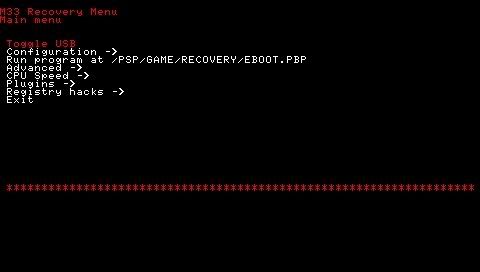
8. Now restart your PSP and enter recovery mode. Go to the plugin menu and enable popsloader.prx. Then exit recovery mode.


9. Run your PSX Game. The first time you use Popsloader a menu should appear asking you which version of pops you want to use. It won't appear the second time, but if you want to change it hold down R while booting the PSX Game.

That's it for popsloader. You'll most probably never need to use this plugin, unless you're playing a difficult game that runs better on a different pops versions. But if you do, you'll be glad this guide is up here.

Get popsloader: Download

PSP Slim USB Charger Plugin

Noobz has just released a plugin for the PSP Slim that will allow you to charge it via USB without enabling the USB connection. Previously USB Charge would only work when the USB connection was active, you couldn't just plug in the USB cable and have the PSP Slim charge. But with this plugin, simply plug the USB cable into your Slim and it'll start charging, in the XMB and even while playing games!

That said, we take no responsibility for any problems that may arise from using this plugin. Using an inappropriate charger might cause damage to your PSP Slim.

Download from the file archive: Download

Saturday, September 29, 2007

Custom Firmware Extender v1.6

Cpasjuste has released an updated version of his Custom Firmware Extender plugin, which is now at v1.6. It's now compatible with custom firmware 3.71 M33 on both the old PSP and the PSP Slim. Other features added include the hidden 5th brightness level for PSP Slim and on-the-fly overclocking for games.

However, custom key combinations have been removed due to incompatibility with the 3.71 firmware. To show the list of button combos, press Note + Vol Up.

As the name suggests, this is one plugin that has to be on any PSP with a custom firmware. The additional features that come along with this plugin are a must have for all custom firmware users. Installation is via the same method as other plugins.

Get it from the file archive: Download

CWCheat BETA2 for 3.71 M33

CWCheat has just been updated to BETA2 for the latest custom firmware, 3.71 M33. In this update, features like screenshot, cheat searching and CPU speed changing have been enabled. In fact, this update has almost as many features as the original CWCheat. Looks like the lack of the 1.50 kernel has not stopped homebrew developers!

Note that you will have to install this over the Revision E installation. Extract the files from Revision E to the seplugins folder first, then extract the files in this package and overwrite the old ones.

Download from the file archive: Download

Screenshot plugin for 3.71 M33

A very basic screenshot plugin for 3.71 M33 has been released. Use the Hold switch to take a screenshot, either in the VSH or in-game.

Unfortunately, this plugin is still rather basic and you can't customize the screenshot key. If you rather have another key as the screenshot button, you might want to try Custom Firmware Extender v1.6, which supports customizable keys and is compatible with 3.71 M33.

To install, just copy screen.prx to the seplugins folder, and add the line "ms0:/seplugins/screen.prx" to vsh.txt or game.txt, depending on where you want to use the plugin.

Get it from the file archive: Download

Friday, September 28, 2007

JoySens v1.2

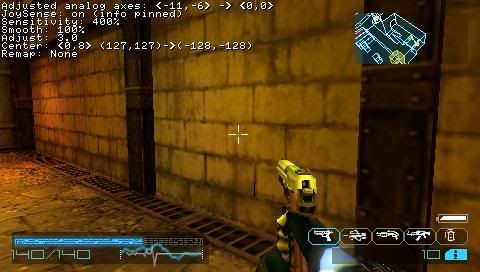
JoySens is an analog stick sensitivity plugin for custom firmwares. With various options available like sensitivity and smoothness, this looks like a plugin to finally fix the analog stick in the old PSP. To install, follow the instructions given previously on How to Install Plugins on Custom Firmware.


Plugin at work

When I tried this plugin, I was amazed at its power. With a few simple key combinations I was able to change the sensitivity of the analog stick, resulting in it becoming more accurate and precise.

By setting sensitivity to 400%, I got better control in my games like Crisis Core and Coded Arms: Contagion. This is probably the setting that will help you make your old PSP's analog stick just like the PSP Slim's one. As everyone already knows by now, the Slim has a redesigned analog stick, which makes it easier to move around. With JoySens, your old PSP can now enjoy a smooth analog stick as well.

Other than that, the settings are more of a trial and error. Have fun adjusting your analog stick for better performance!

Download

Installing Plugins on your Custom Firmware

I'm back from my 3-day break with a short tutorial on how to install plugins on your custom firmware. This is applicable for all CFW like 3.52 M33-4 and 3.71 M33. However, take note that not many plugins work on 3.71 M33 currently, so do not be surprised if the plugin you're trying to install doesn't work even if you've followed my instructions to the dot.

For this example I'll be using PRXInfo. It's a simple plugin that displays battery information, system information and UMD information.

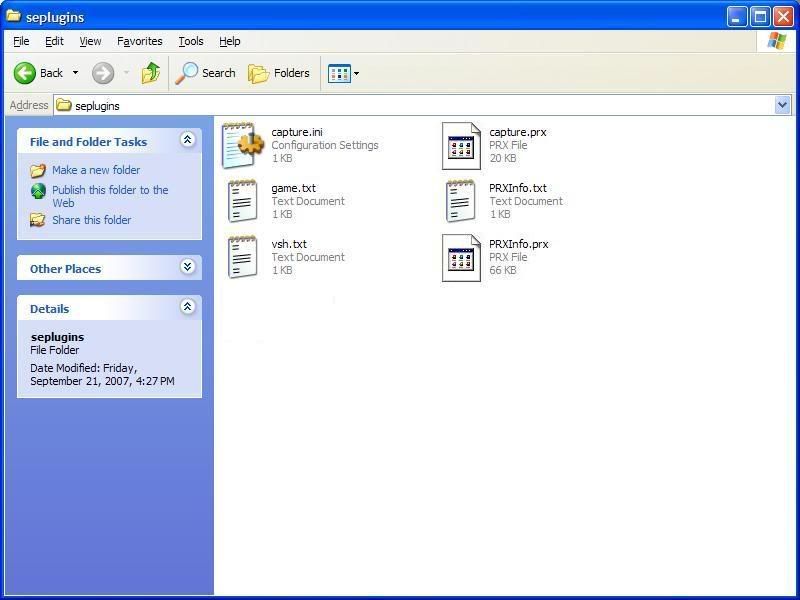
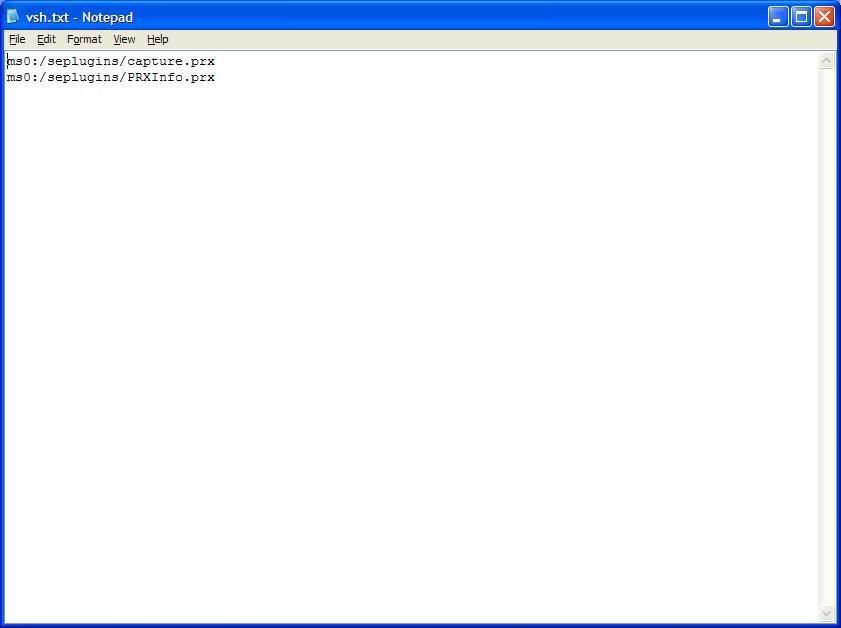
First we connect the PSP to the computer, and copy the plugin files to MS0:/seplugins. There are 5 config files that you can change to control when the plugin will be active. They are called game.txt, pops.txt, vsh.txt, game150.txt and game3xx.txt (for example, game352.txt). Game.txt is for plugins that are loaded when you are playing PSP games, pops.txt is for PSX games, vsh.txt is for plugins in the XMB, and game150.txt and game3xx.txt are for homebrew in the GAME150 and GAME3XX folder respectively. In this case, we want to use PRXInfo in the VSH, so add the line "ms0:/seplugins/PRXInfo.prx" to vsh.txt.


Placing the files into the seplugins folder


Enabling the plugin in the config file

Disconnect the PSP, and enter recovery mode by switching off and switching on your PSP while holding R. Go to the Plugins menu and enable PRXInfo.prx in XMB. Once done, exit recovery mode.

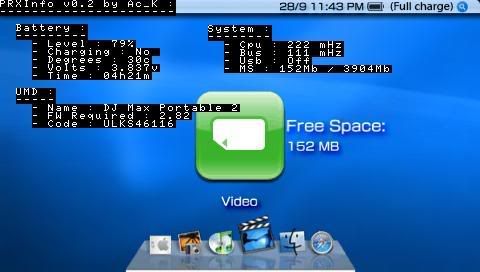
Once back to the XMB, test that the plugin is working. PRXInfo's shortcut key is L+R, so press that now, and you should be looking at some diagnostic information about your PSP's battery, system and the UMD inserted.


PRXInfo working

If you got the same screen, congratulations! You've successfully installed a plugin on your custom firmware! Most plugins will be installed following this method. Just make sure the plugins you're using are for the correct version of your CFW!

Get PRXInfo so you can try: Download

Tuesday, September 25, 2007

CWCheat v0.1.9 Rev F Beta

PSP developer weltall has just released the latest version of his custom firmware plugin, CWCheat v0.1.9 Rev F Beta, for 3.71 M33 firmware. CWCheat is the very first cheat device available on the PSP, allowing you to apply cheat codes just like other famous commercial products like GameShark and Action Replay.

This version of CWCheat is a lite version, with no cheats searching and pops mode. After further testing a full version for 3.71 M33 may be released. You will have to install this over an installation of v0.1.9 Rev E by replacing the cwcheat.prx file.

Check my file archive for the files.

Sunday, September 23, 2007

Custom Firmware Extender v1.4

The public release of the latest version of Custom Firmware Extender by Cpasjuste has just been released. If you've never heard of this before, Custom Firmware Extender adds a few new features for your custom firmware, and it's all accessible even in the XMB!

Some cool features include:
  1. Quick power off / restart
  2. Starting and stopping USB while still in the XMB menu
  3. Capture screenshots and in-game video!
  4. Starting and stopping a ftpd server from your XMB menu
I used to have v1.2 of this plugin, but after upgrading to 3.52M33-4 I decided to uninstall it. Now that a new version has been released and it's tested fully with 3.52M33-4, I'm going to put it back on my PSP! One function that really comes in handy is the USB access from the XMB menu. No more scrolling all the way to the USB Connect option, just press the combo key for USB and you're ready to transfer files to your MSPD.

Installation for this might be a little tricky, so please go through the Readme included in the package. There used to be a way to flash this to the PSP, but I'll do more research on this before proceeding. Flashing it to your PSP lets you use this amazing plugin even when you change your MSPD, which is good for those people who have more than 1 memory stick.

Download


Twitter and Facebook SMS Updates